Concepts applicable to Native Operations include the following.
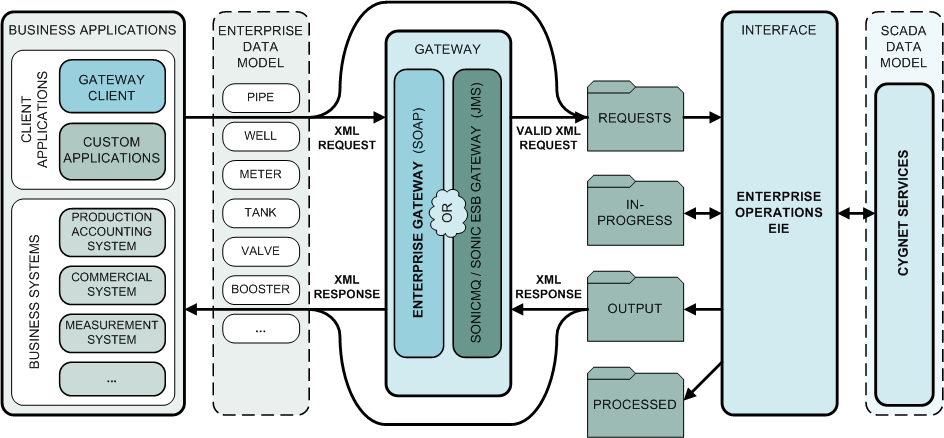
The following diagram illustrates the essential elements and basic path utilized in processing CygNet Native Operations.
The target Service for a native operations request is determined by the service, facility, and point identifiers presented in the request file.
The information which must be specified for a CygNet Native Operation request determines which element is used as an Identifier to provide data for the request. When an operation specifies an Identifier which does not have a relationship with that element, an error will occur.
For operations in which a Service name must be specified, the element <SvcName> is used. The service identified by the element provides the data necessary for resolving the request.
Example
If the request is GetCurrentAlarms and <SvcName> specifies a UIS, the UIS will resolve the request to the CAS associated with the UIS.
For operations in which a Facility ID must be specified, the element <FacilityTag> is used. The format of a facility tag string is Site.Service::FacilityID.
For operations in which one or more CygNet Point Identifiers must be specified, the element <Tag> is used. The service providing the data necessary for resolving the request resolves the point identifier to the appropriate service.
Allowable tag string formats for <Tag> are as follows.
| Format | Example |
|---|---|
|
Site.Service.PointID |
MYSITE.UIS.00000122 |
|
Site.Service:LongID |
MYSITE.UIS:MESA_PDIFF |
|
Site.Service::Facility.UDC |
MYSITE.UIS::MESA.PDIFF |
|
Site.Service.PointID:LongID |
MYSITE.UIS.00000122:MESA_PDIFF |
|
Site.Service.PointID:LongID:Facility.UDC |
MYSITE.UIS.00000122:MESA_PDIFF:MESA.PDIFF |
Native Operations schema files (XSDs) are provided as a reference to schema structure, filters, and constraints. They are statically defined in the Enterprise Operations EIE. XML request files must be validated against the schema file if they are configured to do so. CygNet Native schemas stand alone and do not reference CygNet Business Object schemas.
Comments are included in each file to describe the services or operations for which the items are supported. The files are dropped into the Temp directory.
| Schema File Name | Contents | Includes Schema |
|---|---|---|
|
CygEO_nnn_Operations.xsd |
Describes the operations, including the elements of the operation and, if applicable, filters. |
CygEO_nnn_RecordTypes.xsd |
|
CygEO_nnn_RecordTypes.xsd |
Describes record type definitions. |
CygEO_nnn_FilterTypes.xsd |
|
CygEO_nnn_FilterTypes.xsd |
Describes the filter types that can be used by the various operations. |
CygEO_nnn_AttributeListTypes.xsd |
|
CygEO_nnn_AttributeListTypes.xsd |
Describes references and attributes for list-types requests. |
CygEO_nnn_AttributeGroups.xsd |
|
CygEO_nnn_AttributeGroups.xsd |
Describes the attributes that can be used for filtering, retrieval, or updates. Those listed as 'mutable' are attributes that can be updated using Enterprise Operations. |
CygEO_nnn_BaseTypes.xsd |
|
CygEO_nnn_BaseTypes.xsd |
Describes comparison and Boolean operators, qualifiers, valid character strings, and history rollup types and units. |
Note: "nnn" refers to the released version. The naming convention provides for version control, with new file names generated for every released version. For example, a sample file from the v8.5.0 version of the file would be named CygEO_850_Operations.xsd, the v8.5.1 version of the file would be named CygEO_851_Operations.xsd, and so forth.
Native Operation service filters are defined in the Enterprise Operations EIE editor.
The Enterprise Operations EIE can optionally be configured to validate each incoming request XML file against the XSD schema before executing the operation. Additionally, each outgoing response XML file can be validated against the schema, if the Enterprise Operations EIE is configured to do so. Enabling validation of XML requests and responses is recommended. These options can be configured in the device properties.
History Rollup attributes can be configured in some operations, as specified in the operation request.
See History Rollups in the History section for more information.

|
|
|

